Quick answer
Mount a video doorbell about 48 inches (4 feet, roughly 1.2 meters) above the ground, beside the door on the latch side, with the lens facing the spot where visitors stand. That is the number Ring, Google Nest and eufy all give in their own support pages, and it also keeps the button inside the accessible reach range. The sources differ only at the edges: some allow a little lower or higher, and all of them say to adjust with an angle wedge if your entry is unusual.
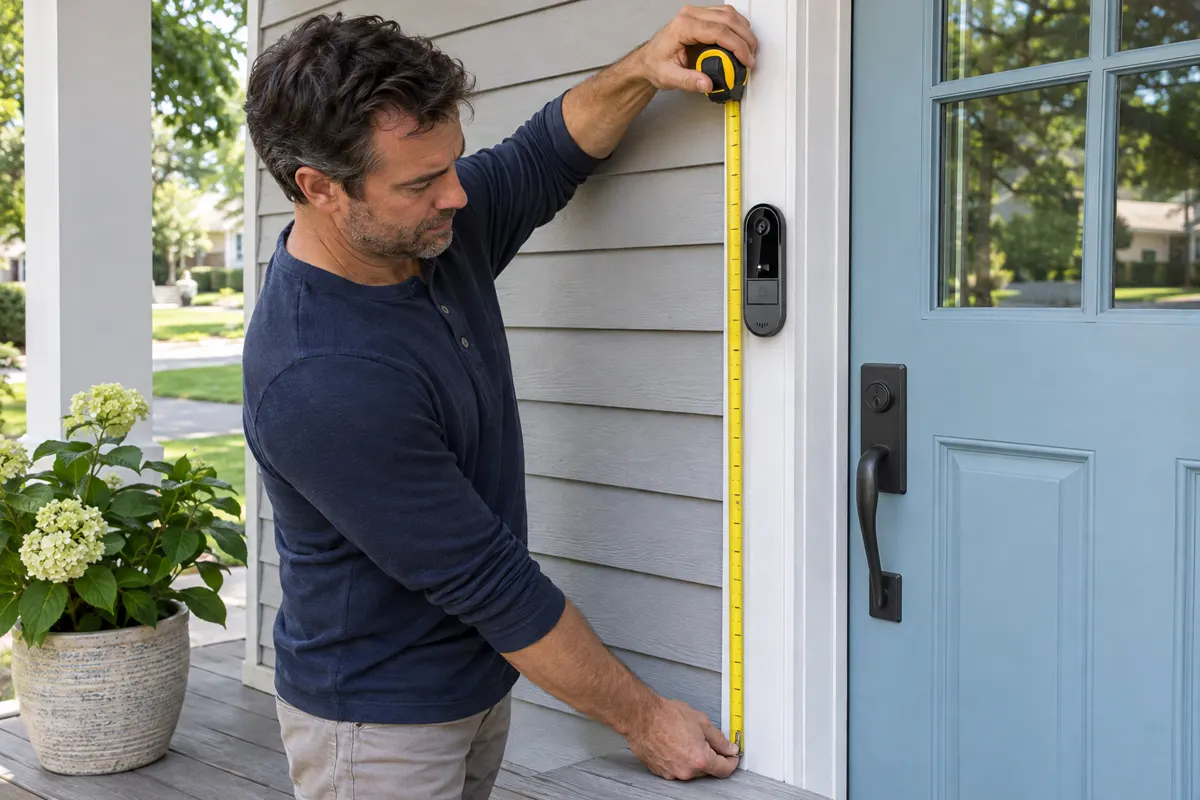
“How high should a video doorbell be?” is one of the first questions people ask after unboxing one, and for good reason. Mount it too high and you get a great view of hats and the tops of heads. Too low and you see belts, packages and not much else. The good news is that this is one of the rare home questions where the major manufacturers actually agree.
We read the official support pages of the biggest doorbell brands, plus the US accessibility standard for reachable controls, and put them side by side. Below you will find what each source says, where they all agree, where they differ and why, and a simple way to find the right spot on your own door.
What the sources say, side by side
| Source | What it says about height | Where to check |
|---|---|---|
| Ring (support article and placement guide) | About 48 in (1.22 m) from the ground for the best motion detection; angle the camera slightly down; use wedge or corner kits if the spot is awkward | ring.com support · checked Nov 2026 |
| Google Nest (camera placement help) | About 4 ft (1.2 m) high, because the doorbell’s tall field of view then captures both people and packages; if there is glare, mount a little higher and angle down | support.google.com/googlenest · checked Nov 2026 |
| eufy (support article) | At least 1.2 m (48 in) off the ground for the best viewing results | eufy support · checked Nov 2026 |
| Swann (support article) | Between 1.2 and 1.6 m (about 4 to 5.2 ft), a slightly higher range than the others | support.swann.com · checked Nov 2026 |
| ADA Standards (US accessibility, reach ranges) | Controls people need to operate should sit within a reach range whose high limit is 48 in above the floor, so a button at or below 48 in is reachable from a wheelchair | 2010 ADA Standards, section 308 · checked Nov 2026 |
We only summarized what each page says. The ADA reach range is written for public buildings, not private homes, but it is a useful reference for anyone in the household who uses a wheelchair or has limited reach.
Where all the sources agree
- 48 inches is the anchor. Ring, Google Nest and eufy all land on about 4 feet, and Swann’s range starts there.
- Measure from the ground where visitors stand, usually the porch floor or the top step, not from the street or the bottom of the door.
- Aim slightly down, not straight out. A gentle downward angle shows faces and the doormat or package spot together.
- Fix awkward spots with an angle, not a new height. Every brand offers or recommends wedge or corner mounts for doors set back in a recess or next to a wall.
- Closer is better for faces. Google notes that people should be within about 20 feet of the camera for good detail, which is why the doorbell goes right beside the door rather than on a far wall.
Where they differ, and why
Higher than 48 inches?
Swann allows up to about 5.2 feet, and Google suggests going a little higher if glare is a problem. The reason is lighting: a camera facing a bright street or low winter sun can wash out, and a slightly higher position angled down cuts that glare. The trade-off is that you see more of the top of people’s heads and less of a package on the mat.
Lower than 48 inches?
Some installers mount a little lower, around 40 to 48 inches, to get a better view of packages and of children at the door. The accessibility reach range points the same way for the button: lower is easier to reach. If your household includes a wheelchair user or small children who should be able to ring, staying at or a little below 48 inches is the safer choice.
Motion detection versus picture
Ring ties its 48-inch advice to motion detection, Google to the field of view, eufy to viewing quality. They are describing the same thing from different angles: at about chest height, the camera sees people walking up and their faces when they stop, without wasting the frame on the sky or the floor.
How to find the right height on your door
| Step | How | Time |
|---|---|---|
| 1. Measure | From the porch floor up the latch-side frame, mark 48 in with painter’s tape | 2 min |
| 2. Test the view | Hold the camera on the mark (or tape it) and check the live picture on the monitor while someone stands at the door | 5 min |
| 3. Check faces and packages | Ask a tall and a short person to stand at the mat; put a box on the mat | 3 min |
| 4. Adjust | Too much sky or glare: go 2 to 4 in higher and angle down. Package not visible: go a little lower | 5 min |
| 5. Mount | Fix the bracket with screws or strong adhesive, following the product manual | 10 min |
| 6. Re-check after dark | Look at the night view once the porch light is on | 2 min |
A few common traps: mounting at the same height as an old wired button (often lower than 48 inches), placing the camera behind a storm door or screen, and pointing it straight into a porch light. If your monitor shows mostly sky, the camera is too high or tilted up.
What this means for a no-WiFi doorbell
Height rules are the same for every doorbell camera, but a wireless no-WiFi model like the Vital Smart Door Home makes testing much easier: there is no wiring to reach and no app to set up, so you can hold the camera at different heights and check the picture on the indoor monitor in real time. Because the camera is battery powered, you are also free to mount it exactly where the view is best, not where an old doorbell wire happens to come out. For the first-day setup, see our guide to setting up a no-WiFi video doorbell, and if you rent, our page on video doorbells for renters covers no-drill mounting.
Our recommendation: the Vital Smart Door Home
If you want a doorbell camera you can put at the ideal 48-inch spot without an electrician, the Vital Smart Door Home is the one we recommend. It is fully wireless, mounts with adhesive or screws wherever the view is best, and shows the live picture on a portable monitor inside, so you can test and fine-tune the height in minutes.
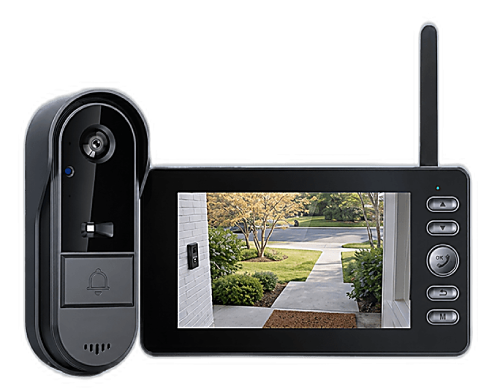
- Truly wireless: a rechargeable camera with no door wiring, so the height is your choice, not the old wire’s.
- Test the view live: the portable monitor shows the picture instantly while you hold the camera on your tape mark.
- See and talk from inside: live video plus two-way audio, motion detection and infrared night vision.
- Private by design: a direct FHSS 2.4G link between camera and monitor; no WiFi, no app, no account and no monthly fee.
Our full review scores it 4.6/5. Current pricing on the official site: 1 unit US$99.99 (regular US$222.20), or the 2-pack at US$89.99 each (US$179.98 total), handy for a front and a back door. Orders ship fast from New Jersey to the USA and Canada, and every purchase is covered by a 30-day money-back guarantee.
Want more background first? Start on our Vital Smart Door Home overview.
Frequently asked questions
How high should a video doorbell be mounted?
About 48 inches (4 feet, roughly 1.2 meters) above the ground where visitors stand. Ring, Google Nest and eufy all recommend about this height in their support pages, and it keeps the button within the accessible reach range.
Is 5 feet too high for a doorbell camera?
It is on the high side. Swann allows up to about 5.2 feet, but most brands recommend about 4 feet. Higher mounting shows more of the tops of heads and less of the package spot; if you must go high, angle the camera down.
Should a video doorbell be angled down?
A slight downward angle helps it show faces and the doormat together and reduces glare from the sky or street. If your door is set back or next to a wall, a wedge or corner mount fixes the angle without changing the height.
Which side of the door should the doorbell go on?
Usually on the latch side, where visitors naturally stand and look for a button. Make sure nothing blocks the lens, such as a storm door, screen, plant or porch post.
Can I mount my doorbell lower for packages and kids?
Yes. Some installers go a little lower, around 40 to 48 inches, to see packages and children better. Test the live view with a box on the mat and a tall and a short person at the door before you fix it.
Is the Vital Smart Door Home easy to mount at 48 inches?
Yes. It is a wireless, rechargeable camera that mounts with adhesive or screws, so you are not tied to an existing doorbell wire, and the portable indoor monitor lets you check the view while you test heights. It costs US$99.99, or US$89.99 each in the 2-pack, with a 30-day money-back guarantee.